Titan OS TV Browser Tools
One-click setup for testing Titan OS in the browser. An internal Chrome extension for auth tokens, environment switching, TV emulation and market overrides.
- Role
- SOLO BUILD
- Less Setup Time
- 95%
- Users
- 25+
- Usage
- Daily
Overview
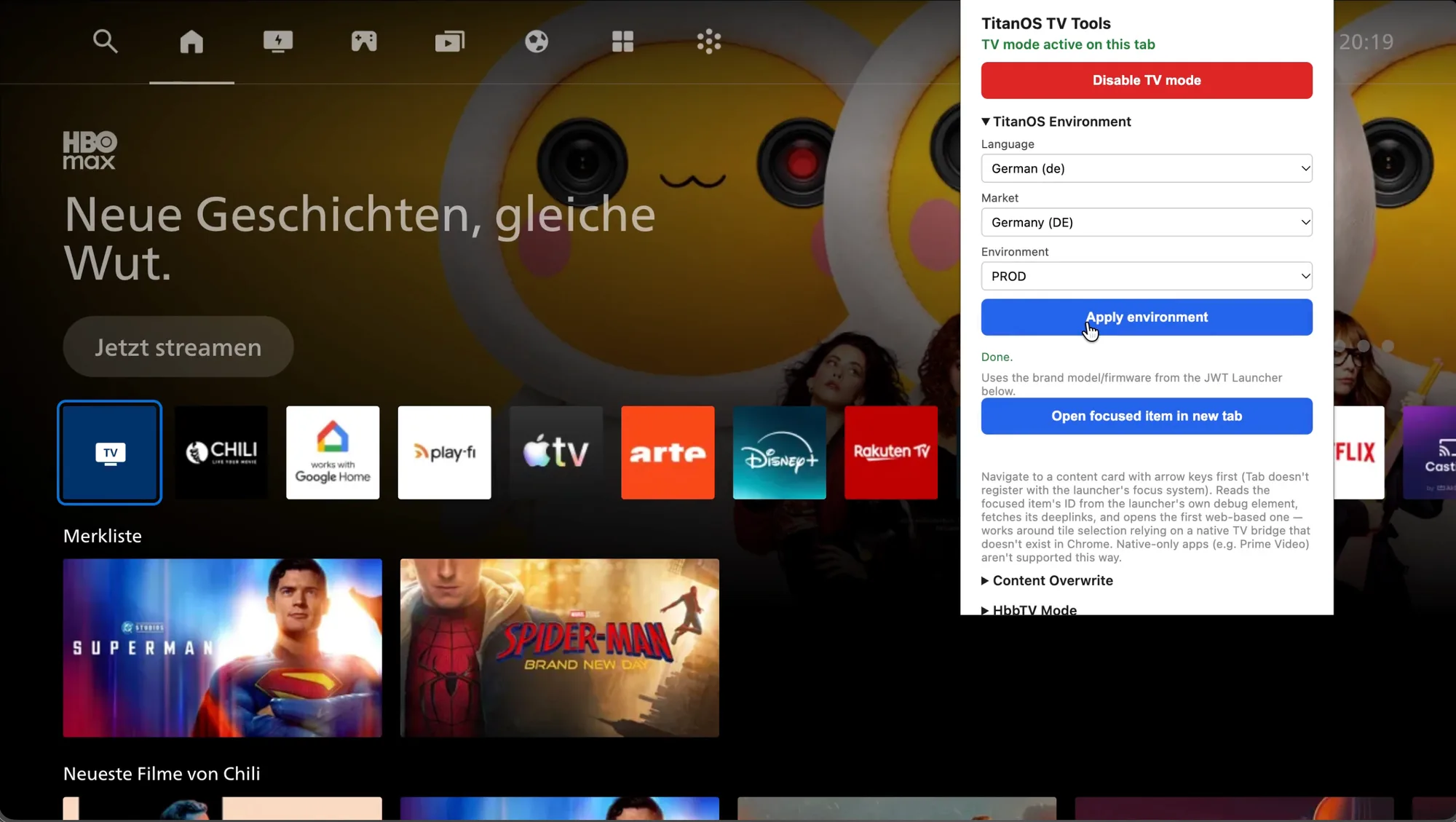
Testing our TV UI in the browser took a lot of manual setup. You had to generate auth tokens in the terminal, edit network headers and change session cookies by hand, often several times a day.
I designed and built a browser extension on my own that handles all of this in one place. It generates JWT tokens, switches between Production, Staging and Dev, emulates HbbTV and the TV remote, changes the User-Agent and overrides session settings per market. It also works around browser limits like HTML5 deep-link navigation, so more of the app can be tested directly in the browser. Setup that used to take several minutes now takes a few seconds.
What started as a fix for my own workflow is now used daily by 25+ people across engineering, QA and product at Titan OS. I’m currently working on live metadata overrides, so we can preview partner content directly in our TV UI.
I used Claude Code as a pair programmer.
Features in Detail
One-Click Token & Environment Switching: Instantly generates necessary JWT tokens and switches between Production, Staging, and Development environments without manual URL edits.
Session & Market Overrides: Overwrites session cookies on the fly to test different UI languages, region-specific markets, and localized content feeds.
Deep Link Handler: Solves browser navigation limits by allowing focused HTML5 app deep links to open cleanly in a new tab with one click.
User-Agent & Header Spoofing: Simulates specific Smart TV device profiles, software versions, and custom headers without navigating browser network settings.
HbbTV & TV Remote Emulation: Replaced failing legacy emulators with built-in TV remote navigation and HbbTV standard support for seamless local testing.
Metadata & Content Lane Overwrite (In Beta): Simulates incoming partner metadata catalogs in real time, allowing teams to showcase how partner content will render inside the Titan OS UI.
My Role
Product Strategy & Discovery: Identified daily workflow bottlenecks across engineering, QA, and partner integration teams; translated internal pain points into a focused feature roadmap.
Engineering & AI Integration: Built the extension end-to-end using Claude Code for rapid prototyping, handling cookie manipulation, DOM inspection, and custom browser header spoofing.
In Beta
- Live Partner Previews: Full visual simulator for partner metadata ingestion and live content lane overrides.
Internal Tool built for Titan OS Engineering & Product Teams.